Showing posts with label itunes. Show all posts

Connecting your TV to the Internet, tips

Connecting your TV to the Internet

Recently there are increasing options to enjoy online content through the Internet as Wuaki or Filmin. Moreover, television offers a web service increasingly complete with a variety of programs available for viewing the more we want. This wide range of online content makes the computer screen is small but we have left, when connecting the TV to the Internet what is the best option? From here we will give you some ideas. We started.

Before you ask the acquisition of a new device, you should review carefully our equipment audio / video, because we may have thought of replacing any of these components or to send us a Blu-ray or hard disk media, for example. Well, it is interesting to note that many of these devices include the role Internet TV or Smart TV, so we can use them as our access to the Internet through the TV.
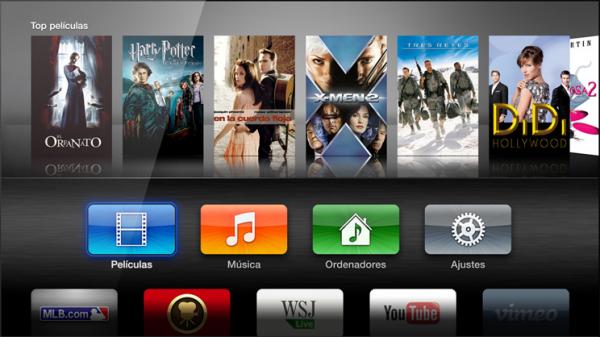
iTunes

Let us also note that also the easiest way to integrate the Internet into our TV is ... buy a TV with the Internet! If our TV already has a few years and if in addition to having no network connection also offers compatibility with high definition images, for example, could take advantage of good deals they are offering brands and distributors at this time. It really is possible to us with a new TV that has the latest in terms of connectivity from very little money.

If we are not interested in changing our TV and just want to add Internet access to our team, the best option will be made ​​with a box of Internet. One of the main options is undoubtedly the Apple TV . This small device is ideal for users of other computers on the block, like the iPhone or iPad, allowing us to easily integrate all equipment, and enjoy their content on the big screen. Of course, all downloaded content must be paid for and through the iTunes Store.
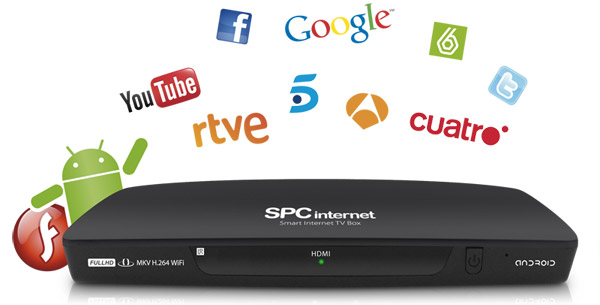
SPCinternet 9200
If we are looking for something more open, it is best to choose a box Android, more complete in terms of file compatibility. A good example is the interesting SPCinternet 9200 we reviewed recently in this page. This equipment allows us to access the Internet through the Google Chrome browser, download applications from the Google website Play, and of course, read all kinds of video formats like avi, mkv vob and even DVDs.

Another valid option is to become a reader of Blu-ray to incorporate the Smart TV, like the Panasonic DMP-BBT01 or more conventional Sony BDP-S590. In addition to reading Blu-ray, these teams have access to the online portals of each brand, Viera Connect for Panasonic, and Sony Entertainment Network in the case of Sony. In the same way that Internet banks, these portals enable us to unburden applications, rent content online, watch YouTube videos or access our Twitter or Facebook accounts.

As you can see, there are several interesting options for accessing the Internet from the TV. Moreover, these new devices are doing to change the way you view television, giving viewers more control over what we see, and offering a complete and varied programming.

If you want to support our job please visit our links, we have a lot of offers for you, if not you can also visit our top 10

iTunes Match Versus Google Music, Which one is better?

iTunes Match Versus Google Music, Which one is better?

Storage services music in the cloud of Apple and Google are already underway. The pity is that, for now, are only available in the U.S.. The launch of both occurred two days apart. First, iTunes Match , which lets you upload all your music on icloud to listen or download streaming songs on any device IOS, an iPhone or an iPhone.
google music

For its part, Google Music combines a system of cloud storage for music files, accessible via Android devices or the web, with a music store in the Android Market. Both cover the same needs: those Internet users who have a collection of digital music they want to access from anywhere. Now, what are the strengths and weaknesses of each?


If we compare in terms of price, it is clear that Google Music wins, because it is free, although the annual subscription to Match iTunes (25 dollars) is not expensive. As for storage capacity, iTunes offers space for 25,000 Match songs, while Google remains at 20,000 Match titles.
itunes match

The device support is also different. Google Music works with any computer connected to the Internet or any tablet or smartphone with Android OS version 2.2 or higher. By contrast, iTunes Match restricts its scope to the IOS device family. Here Google plays by far, to provide access from a computer.

The upload speed of audio files is another important aspect to assess. IBTimes Dave Smith tried it, and says he was able to Google up seven songs in front of a single Music to iTunes Match. However, download speed, both services were tied, as the editor of IBTimes .

iTunes, how to delete the account and unsubscribe

iTunes, how to delete the account and unsubscribe.

Unsubscribe from iTunes is not easy. As you know, the fact delete your account from a service is usually a complicated process, but for this service from Apple the thing is even more twisted. In fact, you can forget to fill out a withdrawal form or you can delete your account by clicking a button that lets you say goodbye forever. The truth is that the formula is rather complicated, so you'll need to arm yourself with patience and take steps to contact Apple . We will help you as far as possible, so we recommend you continue reading this article.
itunes 02


As you know, iTunes is a service that serves as a multimedia player but also as a store of them. You can buy individual songs, entire albums, videos and even movies that allow you to nurture devices like the iPod , the iPhone or iPad , but you will see that it works more or less stable with devices based on Windows , the operating system from Microsoft . Beyond all this, know that if you've signed up for iTunes, there is no turning back immediately. In case you did not know, to unsubscribe from the service will need to contact Apple directly and request deletion of your account. It's complicated: there is no magic button.
itunes 01


Here, we provide a link that allows you to access the site customer support for iTunes, so you have to make a direct question to Apple. First, you can check the support page, where you will have the option of finding any solution to the issues that you have with your products, even your best option is to telephone the following number: 902 151 992, the service technical assistance provided by a customer service hours Monday through Friday from 09:00 hours of the morning until 19:45 afternoon. The service is free, except for the fixed cost of the call, and from there you can request deletion of your account to iTunes. As I said earlier, Apple has enabled an automatic procedure to make the floor. We hope you have luck.

Como creo una cuenta de iTunes sin tarjeta de credito fuera de USA

Como creo una cuenta de iTunes sin tarjeta de credito fuera de USA.

Acaban de comprarse un iPhone, iPod Touch o iPad y desean descargarse todas las aplicaciones gratuitas, antes de recurrir a las de pago, o anexar una tarjeta de crédito / débito? Pues lamentablemente, el proceso no es tan sencillo, pero hoy, demostraremos que sí se puede hacer!

Lo primero que tenemos que hacer, si es que ya estamos conectados a iTunes (quizás con otra cuenta, es desconectarnos).

Screen Shot 2011 07 17 at 10 26 54 PM

Navegamos hacia la parte inferior derecha del iTunes Store y le dan click en la bandera que les aparezca. Cuando aparezcan todas las banderas, seleccionan el país de donde quieren crear la cuenta.

2011 07 17 22 29 56

Una vez elegido el país – y acá viene lo importante – tienen que darle click a “Descargar” a una aplicación gratuita

Screen Shot 2011 07 17 at 10 31 51 PM

Una vez que le hayan dado click a “Free” / Gratis, aparecerá el recuadro que nos permite crear la cuenta. Esto lo hacemos normalmente (proporcionando un email (nuestro Apple ID), una contraseña y demás).

Screen Shot 2011 07 17 at 10 32 44 PM

Lo importante, sin embargo, es que después de haber rellenado lo importante, cuando lleguemos a la sección de opciones de pago, veremos esto:

Screen Shot 2011 07 17 at 10 17 56 PM

Así es. Al estar intentando descargar una aplicación gratuita, la opción de “None” o Ninguna será una de las tantas. La dirección de abajo tendremos que llenarla de todas maneras, pero con “Ninguna”, ya no tendremos que introducir números de tarjeta.

Screen Shot 2011 07 17 at 10 21 42 PM

Finalmente recibiremos un email de confirmación, el cual respondemos, y listo! Cuenta de iTunes creada de manera gratuita.

Este método, como pueden imaginarse, funciona en cualquier país.

Nota: Método probado de manera exitosa en iTunes 10.3 y 10.5 (las más recientes versiones.

Descarga iTunes 10.3 gratis, Ya disponible con todas estas novedades

Descarga iTunes 10.3 gratis, Ya disponible con todas estas novedades.

Ya está aquí. Es la nueva versión 10.3 de iTunes, liberada de forma oficial desde la compañía Apple. De hecho, desde ahora mismo ya la tienes disponible para descargar de forma completamente gratuita desde la página web de la compañía e incluso desde el propio programa iTunes. Y a pesar de que no trae consigo grandes cambios, iTunes 10.3 llega justo después de que la firma Apple haya presentado iCloud, un nuevo sistema de almacenamiento en la nube en el que iTunes tendrá mucho que ver. Las modificaciones más importantes, en realidad, llegarán a iTunes en cuanto iCloud se implante de forma definitiva en nuestras vidas. A continuación, te contamos todos los detalles sobre esta actualización.

itunes103_1

icloud_2

Lo cierto es que iTunes 10.3 ya incorpora algunas mejoras planteadas a través de iCloud, aunque está claro que el resultado final no será el mismo que si el sistema de almacenamiento en la nube se hubiera implantado íntegramente. Por otra parte, hay que decir que los usuarios de iTunes 10.3 tendrán la oportunidad de descargar música de forma automática a todos los dispositivos que el usuario quiera. Esto significa que si compra canciones a través del ordenador, podrá disfrutar de los mismos temas en el iPhone, el iPad o el iPod Touch, por ejemplo.

icloud_3

Pero hay más. Y es que adicionalmente, el usuario tendrá la oportunidad de bajar todas las canciones que hayamos descargado previamente sin coste alguno, de manera que podamos exportarlas a los dispositivos externos. Lo mismo ocurrirá con los libros, puesto que además, los iBooks se extenderán de forma automática al resto de cachivaches también equipados con iOS. La actualización está disponible a través del propio programa. De hecho, es muy posible que ya hayas recibido un aviso para descargar automáticamente el nuevo paquete de datos, aunque como ya sabes, no es totalmente obligatoria a no ser que quieras ser el primero en probar los nuevos servicios de iCloud.

Related Posts Plugin for WordPress, Blogger...

Special Offer for Readers