Showing posts with label galaxy tab. Show all posts

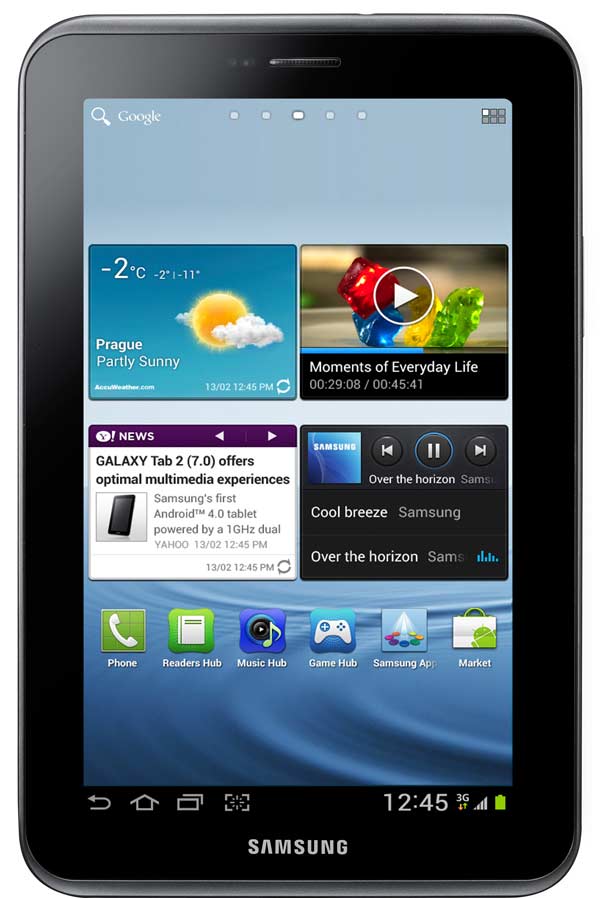
Comparison, iPad mini vs Samsung Galaxy Tab 2 7-inch

Comparison, iPad mini vs Samsung Galaxy Tab 2 7-inch

The iPad mini is a reality. The Cupertino presented yesterday during his new venture in the field of touch tablets. However, in today's market there are models that are less expensive and may be a better choice, especially if you are a heavy user of the services of the Internet giant, Google. Hence, Samsung Galaxy Tab 2 7-inch can be a serious contender. But look at the comparison below what can be expected from both teams:

Design and Display

If it is true, the model of Apple (iPad mini), has an attractive design with good materials like aluminum and a thickness well below its competitors: 7.2 millimeters. Meanwhile, the model of Samsung (Samsung Galaxy Tab 2 7-inch) with a thickness of 10.5 inches, nothing excessive or annoying to carry around all day. Furthermore, the weights do not reach 400 grams in either cases.
ipad mini vs samsung galaxy tab2 imagen1
Furthermore, the screens are multitouch both iPad mini as the Samsung Galaxy Tab 2. Although the size of the two is different: the seven-inch and 7.9-inch Korean model model Cupertino getting a maximum resolution of 1,024 x 600 pixels in the first case and 1,024 x 768 pixels in the second.

ipad mini vs samsung galaxy tab2 imagen2

Connectivity

The tablets of the moment are teams capable of being connected to the Internet for hours. And in many ways: both high speed WiFi points as 3G mobile connections. Both Apple and Samsung are betting on two different versions: a model that includes only WiFi and another version that combines WiFi and 3G.

Meanwhile, the Bluetooth connection will be present on both the iPad mini as the Samsung Galaxy Tab 2. With this technology, both tablets can connect to compatible or transfer files to different computers: computers, mobiles and other tablets. In addition, Samsung Galaxy Tab 2 will share material with other wireless devices using the AllShare feature. But Apple and its iPad mini are more closed. And to use your AirPlay, you must have another computer at home over Cupertino: Apple TV. Otherwise, if you share material, with a TV, for example, the customer must be made with a special adapter.

Meanwhile, in the section of cable connections, Samsung Galaxy Tab 2 provides the ability to insert MicroSD card, use a microUSB port for syncing and battery charging and listening to music through the standard audio output of 3.5 mm . Also, the iPad mini offers only the ability to connect your new connector Lightning, in charge of feeding the battery and sync with a computer.

Finally, while the Samsung Galaxy Tab 2 will offer a GPS receiver in all versions, the iPad will have it available only mini-as usual-in version that combines WiFi and 3G.

ipad mini vs samsung galaxy tab2 imagen3

Camera

Both models offer several cameras: one front and rear other, which will be the principal. None of them integrates Flash for darker scenes. To empzar, iPad mini offers a 1.2-megapixel front camera with which can make video calls in HD 720p up. Meanwhile, the Samsung Galaxy Tab 2 also offers a front camera but with a resolution of 0.3 megapixels (VGA).

Also, in the back of the iPad mini sensor is larger and get higher resolution, five megapixel capable of recording videos in full HD 1080p. The Samsung Galaxy Tab 2 features a three-megapixel sensor and can record videos in full HD with a rate of 30 frames per second, resulting in the movement of natural images.

ipad mini vs samsung galaxy tab2 imagen6

Power and memory

Although Apple's new model, the company has decided to continue investing in technology for some time. And in the interior, instead of including the new Apple A6 processor or Apple A5X you could see in the new iPad , has decided to include the model that used the iPad 2 or the iPhone 4S, ie processor dual core with a working frequency of GHz Meanwhile, the Samsung Galaxy Tab 2 also offers a dual-core processor getting a GHz frequency

Meanwhile, in the RAM, the iPad mini offers 512 MB ​​and the Samsung Galaxy Tab 2 features a GigaByte. The same applies to the size of the internal memory. The iPad mini will be available in 16, 32 and 64 GB, while the Samsung model is available in 8, 16 and 32 gigabytes. But yes, the Samsung Galaxy Tab 2 offers the possibility of increasing this capacity with MicroSD cards up to 32 gigabytes. In other words, move files to the Samsung model is simpler and would not need to use a computer program.

ipad mini vs samsung galaxy tab2 imagen4

Operating system and applications

This section is where the differences are greater. The mini iPad offers Apple's own platform: iOS 6, while the Samsung Galaxy Tab 2 is based on icons from Google in its Android version 4.0. In this there will be for all tastes and who can have the most comfortable the Apple operating system. And others who, by their use, prefer the seamless integration of Google services on the tablet from Samsung.

Mind you, we must bear in mind that for now Apple has not solved the problems that arise in version iOS 6 , while for months Samsung included in its roadmap, the Samsung Galaxy Tab 2 as a candidate to receive the version 4.1 Android Jell Bean, a bonus that will make this tablet-even-move more freely and receive new features and, above all, new graphical look at the Samsung TouchWiz user interface.

In addition, both models offer a wide range of applications that you can download from different online stores. Also in the interior of both models with preinstalled applications will be able to take full advantage. IPad mini offers the ability to purchase e-books, surf the streets and roads, as long as the Cupertino solve the issue of system maps operating or power-talks through iMessage chats with the program.

The Samsung Galaxy Tab 2 will offer versions of the online services of Google: Gmail to keep up to date email, YouTube to watch videos in streaming, or Samsung ChatON Google Talk to chat, Google Calendar to keep appointments a day, etc. ...

Price

Another of the aspects to consider is the final price of the models. And is that the iPad mini part from a price well above the competition. And compared to the case of the Samsung Galaxy Tab 2, the price is 80 euros. The cheapest version of the Samsung model of the 250 euros. While the iPad mini journey starts from EUR 330.

ipad mini vs samsung galaxy tab2 imagen5

Reviews

Size is not the same: 7.9-inch iPad mini in front of the seven-inch Samsung Galaxy Tab 2. But the power of both models is very similar, getting to have Samsung team twice of RAM and a processor with the same characteristics. Meanwhile, Apple has released a model with technology-so to speak-rather outdated way: a model manufactured in facilities like the iPad 2 but smaller in size. Moreover, although it had also hoped Retina display, finally not the case. Hence the rumors jump out and say from the outset that the second generation of the tablet would be outside the sales catalog .

However, the price is a compelling reason to opt for one model or another. And Samsung Galaxy Tab 2 is cheaper: 80 euros to be exact. In addition, integration with Google services is perfect and makes it ideal for users who are intensive consumers Gmail, YouTube, Google Docs or even Google Calendar without using third party applications.

If you want to support our job please visit our links, we have a lot of offers for you, if not you can also visit our top 10

5 reasons to choose a 7-inch tablet

5 reasons to choose a 7-inch tablet

In 2010, the U.S. Apple launches its first tablet . The first tablet, in fact: the iPad . The screen size is 9.7 inches, a standard that arrives today. However, the measure that normalizes the Californian has not been adopted by other manufacturers, something other than what happened when South Korea's Samsung opted for its own proposal, that first Samsung Galaxy Tab that was seen in September of the same year.

Since then, and despite various formats have known-that pass through the screens of 7.7 to 11.6 inches - the seven-inch has been the strongest alternative to the iPad. So much so that even Apple might retaliate with a small form factor tablet, proposing a new standard 7.85 inch native and perhaps the rumored iPad Mini imminent. However, before this, one wonders, what is special measure seven inches to Amazon, Samsung and Google have adopted as their battle standard?

Nexus 7

For starters, it is a format that defines a substantially more portable device. We still remember the punch that gave Samsung when during the presentation of its Galaxy Tab in 2010 surprised the show, in the first public appearance of the terminal, the device removing it from the inside pocket of a jacket. Not that the tablets with seven-inch screen are specially designed to carry in your pocket, but of course, extend the range of comfort as far as mobility is concerned.

It is the perfect size for reading and viewing videos. Such screens boast resolutions between 1024 x 600 pixels and 1,280 x 800 pixels, which focused on seven-inch panels show excellent results as far as definition is concerned. True, the new iPad boasts a spectacular resolution that far exceeds the standard in high-definition 9.7-inch, but the proposal of these devices is quite another, much more connected to other aspects of the terminal, such as that mobility or price, as discussed below. Thus, in these panels is contemplated that the option can enjoy videos or ebooks with much comfort, but we miss an area much larger vision.

Samsung Galaxy Tab 7.0 Plus

Terminals are much cheaper than those in higher formats. In this sense, the Kindle Fire became the first blow on the table for the tablet market. The strategy has had the Nexus 7 to the wake, and other manufacturers such as Samsung or Booq Spanish, also support the idea of identifying the standard seven-inch with an affordable price. The idea is that the user can take home a well-rounded tablet by an average of 200 euros, the price thicken somewhat depending on features like memory or connectivity -.

A tablet with a seven-inch screen is far more comfortable than a larger one. It is true that this type of equipment are designed to move from one place to another, and in some cases, may even consider laptop as substitutes. But make no mistake: the couch, the bed and perhaps other more private sites will house natural environments where recourse to the tablet more often. Thus, the idea of holding a lightweight and manageable while lying on your back are either reading, watching videos, surfing the web or checking emails or social networks, it seems much more attractive if it is a terminal hold bulkier and heavy.
Samsung Galaxy Tab 7.0 Plus
It gives a very curious circumstance terminals with seven-inch screens. Since Android is the only really defined before the iPad, arguably the only environment that offers an interesting option for tablets outside the iOS environment. And is that with Android 4.0, since applications can be shared between devices-whether smartphones or tablets - we could take advantage of the games and utilities designed for phones without a noticeable loss of quality, despite differences in the size of the panel between phones and tablets. For devices with larger screen sizes that besets Loss Pack is much more.

If you want to support our job please visit our links, we have a lot of offers for you, if not you can also visit our top 10

Using the Samsung Galaxy Tab 7.0 as GPS for your car

Using the Samsung Galaxy Tab 7.0 as GPS for your car

One of the coolest features of our smartphones and tablets is that of GPS . Virtually all smartphones and tablets on the market and we have this tool that allows users to enjoy some applications and services that require location, but also use their devices as a GPS navigator, a function that previously only had occasion to run on a dedicated browser, type TomTom , to cite one example trite. The fact is that at this point, any device that incorporates SIM card can function as a navigator in the car, even offering voice instructions to drivers to not have to be compromised at the wheel. If you have a Samsung Galaxy Tab 7.0 and Samsung Galaxy Tab 2 7.0 and want to start enjoying this feature, today we will tell you some of the keys to run the service in a quick and easy. Here are some simple steps to follow-instructions.

Samsung Galaxy Tab 7 GPS 01

Prepare your tablet

First, you should know that the Samsung Galaxy tab 7 may be used as a GPS in the car. The screen size seven inches, is the maximum allowed by the Directorate General of Traffic (DGT), so that you can install in your vehicle without any problems. Later we will give some instructions to add it to your car in the most suitable. Do not worry about it. However, to activate your Samsung Galaxy Tab 7 connection first must turn GPS tablet.

The device has a receiver for global positioning system also known as GPS, which you can activate by clicking the Settings section by selecting Location Services. Once inside, select the function Use GPS satellites to enable the system to find your location and use it to perform the services of Google .

We remind you that the GPS functions consume a lot of energy, so if you want to keep the battery of your phone and do not need this service, the better you disable. You may have problems with the GPS if bad weather near electromagnetic fields or high voltage. It also does not touch or cover the area surrounding the antenna with your hands or other objects while using the GPS functions.
Samsung Galaxy Tab 7 GPS 02

Active Navigation

Once activated the GPS, you have to open the Navigation application, which is responsible for providing the navigation service. Suffice you access to applications and tap on the Navigation icon. Then you will have to enter the destination. You can do this by typing (the traditional way) or even orally, because the device will recognize the site if you say it in a clear, vocalizing. Another interesting option is to enter your destination by clicking on a contact that has built-in address. So it will be much easier to go to a place with which you are familiar. Same with the addresses you've added as favorites. From that point, the application will start to offer navigation voice instructions. If you access the configuration, you will also have opportunity to add additional layers to see the road conditions, traffic and other factors that may affect your trip.

Adapts the device to the car

As I said at the beginning, it is best done with a system that allows you to carry the Samsung Galaxy Tab 7.0 in the front of the car. In the official store of Samsung, for example, sells under the Navigation Kit ECS-series name V980BEG Galaxy Tab 7.0 which is compatible with both versions of the seven-inch tablet. Works caught with a sucker (in principle, and as indicated by Samsung, high suction power) and also serves to charge the battery while driving, which is also an added advantage. The platform meets all safety regulations.
Samsung Galaxy Tab 7 GPS 03
If you want to support our job please visit our links, we have a lot of offers for you, if not you can also visit our top 10

¿iPad or Samsung Galaxy Tab? Which is better?

¿iPad or Samsung Galaxy Tab? Which is better?

¿iPad or Samsung Galaxy Tab?

If you hast cast out the ten keys on which we invited you to consider when deciding what to evaluate when choosing a tablet , perhaps you have a new dilemma that silver swing between family iPad and the range Samsung Galaxy Tab . They are two of the most popular choices when buying a tablet in our country which are not yet on sale, and Kindle Fire Nexus 7 -. Given this, the question is which of the two ranges is better. However, as usual in these cases, the utility will give the user looking device will largely determine the extent to which a terminal can be imposed on the other.
¿iPad o Samsung Galaxy Tab?

Something that enriches the panorama of options regarding the Samsung Galaxy Tab iPad points to the variety of available models. While Apple's range is limited to two terminals - the first generation iPhone is not for sale through official channels, beyond the settlement of stock, limited to second-hand market, with the family of tablets Samsung can choose among many possibilities, provided models with screen 7, 7.7, 8.9 and 10.1 inches. Samsung Galaxy Tab

Judging criteria devices for memory, the thing is balanced, provided they do not think about the possibility of expanding the terminal capacity with external drives. Depending on the edition of the Galaxy Tab we want, we can find options ranging from eight to 64 GB, while in the case of options iPad oscillate between 16 and 64 GB. As we say, Samsung will have terminals with which we can incorporate microSD external memory, with the possibility of coupling units up to 32 GB.

iPad

However, when trying to determine whether it is better to us with an iPhone or one of the Samsung Galaxy Tab, the question will be about other issues. For example, the technical characteristics, freedom of choice of applications and system integration.

Starting with the power of the tablets, roughly, the iPad have dual-core processor, if we talk about the model that went on sale in 2012, we would do a more powerful unit, complemented by a very fast graphics unit - , 1 GB RAM and autonomy of about ten hours in heavy use by Wi-Fi. The Galaxy Tab expand the fork, based on processor models with more options mononucleosis to solvents. The current generation of processors leads to four cores on the top end. We refer to the tablet Samsung Galaxy Note 10.1, which includes a 4-nuclei accompanied by no less than two GB of RAM - with those who move with great ease icons in Google Android version 4.0 Ice Cream Sandwich. The top model of the Galaxy Tab family, has a double nucleus.
Samsung Galaxy Tab
In terms of integration with the operating system, the current models - Samsung Galaxy Tab 2 10.1 7.0 Galaxy Tab 2, Samsung Galaxy Galaxy Tab 7.7 and Tab 7.0 Plus - already in the list of compatible handsets to capture the last Google update.

By the way, an icon system adopted by all manufacturers (except Apple). The proliferation of hundreds of tablets of all brands with this system, are driving in a record number of applications and features made ​​by another brand and will have a much higher development of Apple hardware in the coming years for this same reason. This is something that we already live in the 80's when Apple opted for exclusivity and Microsoft for the environment open to all manufacturers. The result of that struggle was settled around 1995, when Microsoft was made ​​with 96% of the worldwide computer market, while Apple only controlled a limited 3%.

iPad

Precisely in point of the system is where we need to look carefully when deciding on a family or other devices. Of the iPad include dedicated integration, which follows logically from the fact that Apple shaped pieces that fit the technical profile of the device exploits the possibilities of the operating system, and vice versa. This also brings the iPhone's greatest weakness. To improve integration, Apple intends to do everything through their stores. we buy music, movies, apps, books, video games and all we want, but through Apple stores. In fact, historically, the policy of the U.S. firm is based exactly on this. Once you have the platform , buy all the accessories, and multimedia files by themselves and the single price monopolist fixed immovable and Apple. There are users comply with this. Do not mind paying much more for the simplicity of access. For Apple, the whole closed system is the basis of their enormous business.

Fans interested in having a team with more options, more open, will be better driving a Samsung tablet. May not so easily find that song or that movie, but looking a little more, will surely have much more variety in both media as in applications and, of course, free or at a price much cheaper than using an iPad.

As for the relationship between Android and Samsung, to conform to the program when updating the Google platform, is very close. Thus, although Samsung does not make the system icons, devices involved in the Korean roadmap Google system improvements with a more or less tacit preference.

iPad

Although he blames external devices to Google-Nexus teams - which fall outside the explicit preferences of Internet giant, the reality is that in the case of Apple computers goes something like that. Just check the announcement by Apple last June when he presented the latest version of its platform, IOS 6. At that time there was surprise among locals and alleged that the first iPhone, a model which only takes a couple of years in the hands of its owners, would remain outside the program updates it is not compatible with the edition that at that time was presenting. Indeed, a similar argument is to be blamed at the time the first Samsung Galaxy Tab, presented a few months after the founding of the iPhone version, when he knew he would catch up with Android 3.0 Honeycomb.

Samsung Galaxy Tab

Another of the plans that we put under the microscope when assessing whether to take home an iPhone or a Samsung Galaxy Tab points to the things we can do with one or other device. Functionally, both families are very versatile. The difference is in several points. For example, mobility: Samsung models with screens of seven and 7.7 inches is especially convenient if we take them with us without too much bulk. The media plan also makes a difference. The iPad dela require conformity of the virtual office is iTunes, limiting the types of audio and video file you can put on your computer. With the Samsung-Android does not happen. We could organize our libraries as we want and, above all, using a variety of formats-for example, the Samsung Galaxy Tab can play DivX or MKV HD thing to do on the iPad would be needed converters and intermediate steps.

iPad

Some will find a powerful screen resolution on your computer. In this sense, the new iPad panel provides greater definition of the market, delivering 2,048 x 1,536 pixels on its 9.7 inches diagonal.

The Galaxy Tab displays the range between 600 and 1,024 x 1,280 x 800 pixels, depending on the model you choose, ciñiéndose the first value for models with smaller panel. It is also true that Samsung is the firm that offers a slightly larger screen on a slightly thinner and lighter.

Data are not conclusive to decide. Same goes with the theme of the definition of the screen. At first glance it may appear that the super high definition contained in the new iPhone may actually be more attractive than the lower definition of the Samsung models. This is much trickier than we think, first, because the quality of HD movies can be found today have at most 1,080 lines of resolution. Why we want 2048? Moreover, in a screen size of these tablets as to claim that we appreciate the difference in resolution is a fallacy. We really differentiate a movie costs 625 lines of other high-definition (1,080) in a TV 32 "monitor in a tiny 9 or 10", an exercise is futile and impossible.

Above, multiply the screen resolution carries a couple of problems: first, the amount of information that moves with that quality performance requires too powerful, so we risk that the equipment is heated more than is desirable to because of the effort made ​​by the processor, on the other, to enjoy the content with that resolution requires the availability of applications and quality videos in a format adapted to that, so that the files will be heavier, making the memory suffer. And that for which files get adapted to this resolution.

Samsung Galaxy Tab

In short, we are faced with two interesting families of tablets. What will determine what we decide on one or another is the interest that we put in the size we want for our device, the versatility of your system and the price.

The versatility has to do with the type of applications available and the possibilities we have to take advantage of its multimedia and Internet services. The price, in the case of the iPad, the fork moves between on the one hand, EUR 400 iPad 2 and, secondly, the 480 and 800 euros for the new iPhone, if you want a Galaxy Tab, the options are more affordable: from 250 euros we could get hold of the Samsung Galaxy Tab 2 of seven inches.

iPad

If you want to support our job please visit our links, we have a lot of offers for you, if not you can also visit our top 10

Shopping Guide: 10 key points to buy a tablet

Shopping Guide: 10 key points to buy a tablet

The growing market for tablets has raised more than one user if, when renewing your laptop, maybe I should not think the ability to jump to the attractive personal display technology. No wonder: the tablets offer a level of portability, ease of use and in many cases, autonomy sometimes are unbeatable for a laptop or netbook. However, it is sometimes difficult to consider what device to choose between the forest of options that are in the market. Let's see what criteria should you follow to select the tablet q ue best suits our needs.

Screen Size
Samsung Galaxy Tab 2
So. That size matters. It's not the same drive a seven-inch panel to another it is significantly above the ten-inch, nor inquire contained in a horizontal format to do so in a more aimed at the classic 4:3. Given this, what kind of screen is better? It is difficult to pin down. In fact, impossible.

Each user will feel more comfortable with a choice. If we want to enjoy an unprecedented resolution, we can choose the new iPad, which at 9.7 inches distributes a total of 2,048 x 1,536 pixels-the most powerful of the market definition. If, however, we prefer a large area, the 10.1-inch models from Samsung, as the Galaxy or Galaxy Tab 10.1 10.1 Note - be our best option. There are other possibilities in this format, betting on widescreen formats, such as Packard Bell Liberty Tab.

Another possibility is to go for smaller formats. The seven inches is the star in that direction. It is a size that was opened by Samsung with its first Galaxy Tab, and today is available in models like the Samsung Galaxy Tab 2. In fact, the South Korean firm is one that has a fork full of proposals in this regard, since it also has in its catalog a model with panel of 7.7 inch and 8.9 inch. Nevertheless, continuing with the proposals in seven inch is coming soon in our country a device manufactured by Taiwan's Asus to Google, the Nexus 7, a terminal, as shown below, presents other arguments that make it very attractive -as the price and the operating system.

Operating System
Samsung Galaxy Tab
Fundamental. It is not the same as having a terminal IOS-based Apple platform - Android-foil Google - or Windows-on future versions that Microsoft will showcase commercially from Autumn. Again, it is risky to make judgments about value. What we can do is put data on the table. IOS 5.1-after the summer will iOS 6 - is the system more dedicated applications for the Apple tablet: more than 250,000 programs and games, and more than 650,000 apps in total , contanto with iPhone and iPod Touch, which are interpolated to full screen display.

In the case of Android's decision will not only jump on the bandwagon of the green robot. Also, examine the full range touch tablets available-from the most economical, with prices around 100 euros, to the most advanced in excess of 500 euros - which will have different versions of the platform. The outdated versions will have more affordable - Android 2.2 FroYo - while the more advanced editions dedicated to bet for tablets.

In this sense, we'll meet again, with the choice between Android 3.0 Honeycomb, Ice Cream Sandwich Android 4.0 and Android 4.1 Jelly Bean. For now, this last option only found in the Nexus 7-and the Motorola Xoom, by upgrading. It is best done with a device with Ice Cream Sandwich: thus we ensure a greater margin of support in the applications that you download and have the option to upgrade to versions that we can come.

Design
Sony Tablet P
For many, the design of the tablet will not be a determining factor when deciding on either team. But this is a very interesting section view of the proposals that populate the market. The vast majority of available terminals are practically identical in this sense, beyond the dimensions and proportions in its construction, although some stand devices argue precisely in terms of appearance. There are three terminals in this line, we could bring up. On the one hand, Sony and Sony Tablet Tablet S P.

The first part of a price of 400 euros, and has a back that describes a small wedge that is useful to write about when they lodge in touch screen on a horizontal surface. The second, which is available from 500 euros, is more original. It is a tablet with two parallel screens, the Nintendo DS style, and a clamshell design, so that when closed compact dimensions resembling a small case.

On the other hand, it is interesting to consider the purchase of Toshiba AT200, which advocates a surprising thickness of only 7.7 millimeters, as the main defining value. It also has some interesting features, capable of competing with other Android devices and a very reasonable price of 500 euros.


¿Wi-Fi or 3G?
ASUS Eee Pad Transformer
Here the plot thickens. The rule is clear in all makes and models: issues with 3G connectivity, that is, to access high speed mobile data, will require additional expenditure to which only have access to the Internet via Wi-Fi. So you have to consider whether you really worth paying a few hundred dollars more, this is usually the difference between models with and without 3G - in addition to committing to a subscription of data with the carrier of your choice.

In this sense, think about where you will use the tablet mostly. If you have most of the time at home or office, is more than possible that the Wi-Fi model of your favorite tablet is more than enough. Remember that many of the smartphones that populate the market Hotspot options available, so you could share the mobile connection in the street to connect via Wi-Fi sensor of the tablet. Otherwise, if you give intensive outside the influence of wireless home networks or professional, would you consider investing more in the 3G version of the terminal of your choice.


Local Connections
Nexus 7
The debate marked the USB tablet market since its inception. When first introduced the iPhone, back in 2010, critics were primed with the device lacking the standard connector that delights users' computers and laptops. However, is it so important the presence of USB or microUSB jacks?

There are terminals, such as models of Samsung, who have also opted for proprietary connections that unless we use adapters, can not be linked with other devices via USB. Since the tablets are designed to find information online, rather than to insert or remove, it makes little sense as a primary value the presence of USB or microUSB. However, it does have its importance.

For starters, the USB is, as we say, a standard in many cases provide functions for data traffic, you can synchronize information with a computer, play content from an external computer or a portable modem prick - and recharge your battery. And given his status as standard, we use the same cables with other devices would be worth us to the tablet. Otherwise, it is essential to be done with cables or adapters owners who sell us the manufacturers of tablet.

Another issue is the palette that offers more connections than USB and the dock owner. Remember that if you use the tablet as a multimedia platform, connecting to the TV in the living room, for example, to play movies or videos hosted on the Internet - you interested in testing the device has physical options for high-definition output through HDMI or MHL -, or wireless-DLNA, in the case of Android, or Airplay for iPad -. The presence of GPS and Bluetooth will also enrich the experience of using the device.


Multimedia
Toshiba at200
There are two fundamental points when assessing a tablet in media playback criteria: the supported formats and storage media. Regarding the former, Android handsets are richer and complete. The vast majority of market terminals play almost anything you want: from the usual MP4 or WMV to advanced DivX and MKV HD. We talk about video, clear audio issues because we should not worry about anything: we will find virtually no trouble hearing any sound file. Similarly, in the case of Android tablets, many facilities will have to enter in the memory of the device. Attendees may use applications, such as Samsung Kies, if the terminals of the Korean company - or make the computer detect the computer as an external storage unit.

There are, however, facilities that we have in IOS. Unless you resort to tricks or breakouts-by Jailbreak - everything we put in the iPad will happen, necessarily, for iTunes. This not only conditions us when to choose and order freely to channel content. In addition, we will determine the supported files. By converters and third party applications not covered could transform files among formats supported in permissible content, which, seen thus, can become a nuisance.


Cameras
Samsung Galaxy Note 10,1
Some believe that it makes little sense to put cameras on a tablet. Due to its characteristics, can be quite ridiculous to these devices to take pictures. At least with the main camera. However, positions to concentrate on the computer functions, you better be extra to be missing. Most terminals in category Android bet by a combo dual cameras, where the main sensor would have three to five megapixels, while the secondary unit, located on the front of the tablet-would shift between VGA resolution and quality two-megapixel camera. The iPad, in this sense, has a combination of five-megapixel sensor in the main and secondary VGA. However, we could also find devices which dispense with one of the two units, the back, especially. Such is the case, for example, the Nexus 7 from Asus and Google.


Memory
Sony Tablet S
Is it important to justify the choice of a model that integrates memory? Sometimes yes. However, what can condition the purchase of one or other device sometimes not so much memory to load standard as the possibility of expanding the internal capacity with external drives. The iPhone, for example, will not give us this option. We'll have to settle for options 16, 32 or 64 GB without any choice of having more capacity-beyond the solutions in the cloud, which is available to any other terminal. In the case of few non-Android models this possibility is available to several models. The Acer Iconia, for example, allow us to install microSD cards up to 32 GB extra, the Sony Tablet S also supports memory expansion-indeed, in this case, memory is contingent on the card that you say.


Processor
Acer Iconia Tab A700
Again, the hairpin is opened possibilities. It is likely that most users do not pay attention to this section, although the choice of either model for its price is strongly influenced by the power that develops on account of your processor. In this regard, in the vast majority of cases we will find units of one or two cores, and at least four cores. To sample the new iPhone, introduced in 2012, carries a dual-core unit, significantly faster than the iPad 2. But there are many models of Android group that have been decided by the four cores. In short, we will see in stores 10.1 Note the Galaxy, one of the banners of the Korean company in this group. China's Huawei will also climb on the bandwagon of quad-core, and even Asus has in mind a model of your Transformer of this family.


Autonomy
iPad
The netbook is afraid of the tablet. Even some laptops are thrown to tremble at the personal screens. It is not by power but by autonomy. If we think of the tablets as digital entertainment platforms and windows to query data on the network, which provides the versatility of these terminals blush comes to laptops. And of course, autonomy does not help them raise their heads on the tablets. In some cases, and measuring very specific conditions of use and use-only web browsing over Wi-Fi - could withstand a constant duration of up to ten hours as official rates. Such is the case of IPAD.

The Galaxy Tab 10.1 claims to support nine to 72 hours, depending on if we play the music or video continuously, respectively. The powerful Asus Eee Pad Transformer, meanwhile, we can hold between 9.5 and fourteen hours, depending on its use or not to dock ANADER a physical keyboard at all. So, how much notice is capable of supporting the autonomy of the devices you have in mind among the possible choices to make with a tablet, and that ultimately can make a big difference depending on the model you finally select.

If you want to support our job please visit our links, we have a lot of offers for you, if not you can also visit our top 10

Samsung tells us why the Galaxy Tab 2 7.0 is better

Samsung tells why the Galaxy Tab 2 7.0 is better

The company Samsung is ready to defend tooth and nail the technical specifications of their new tablets and specifically, the Samsung Galaxy Tab 2 7.0 . The truth is that the firm is willing to convince customers that your device is a high-tech piece of very good quality compared with other tablets from the competition. 

Do not forget, in this connection that the American company Amazon has brought out a device called Kindle Fire that competes head-on with all the tablets that are being presented to date, including the new iPhone. And is that Amazon released the Kindle Fire at a price much more affordable when compared to other devices, since it is on sale for $ 250, which would be about 190 euros at current exchange rates. Not content with the presentation of the tablet, Samsung has sought to clarify all the features and advantages of the Korean tablet.

samsung galaxy tab 2 01
 
All three devices at the time, the Galaxy Tab 2 7.0, the Amazon Kindle Fire and Barnes & Noble Nook Tablet share a dual ARM core, running at a speed of 1 GHz. RAM device from Samsung, however, comes to 1 GB, which does not happen with the Kindle Fire, which barely reaches 512 MB, as the tablet Nook. In the latter case, Barnes & Noble has decided to create a new edition of 1 GB. 

All three devices feature a user memory of 8 GB, but only the Galaxy Tab 2 7.0 and the Nook offers the user the possibility to extend this capability with microSD memory cards up to 32 GB. In this sense, the Galaxy Tab 2 7.0 runs through the operating system Android in its version 4.0, the last one the company unveiled Google , also known as the Ice Cream Sandwich . The other two devices hit the market running Android 2.3 Gingerbread .
samsung galaxy tab 2 02
The screens are exactly the same, arriving at seven inches and a resolution of 1024 x 600 pixels. The Galaxy Tab 2 7.0 also incorporates a three-megapixel camera, plus a 0.3 megapixel front camera we come phenomenal when making video calls. The Samsung device also features 802.11 WiFi , Bluetooth and GPS options that are not operational in the Kindle Fire and Nook. All of these devices also incorporate a battery 4000 milliamperes, although the Kindle Fire integrates a piece capable of 4,400. The measures are virtually identical, though the Nook is a little larger by a few tenths.

It is clear that price is a little different. The Samsung tablet costs $ 250, Kindle Fire is labeled by 200 and the Nook costs 200 or $ 250, depending on whether we choose the 8 GB or 16 GB. Customers who have purchased the Samsung tablet also can access the application download via Google Play, Samsung App Store Apps and Amazon. The owners of either tablet will have access to their shops. 

This is reality. In any case, there are some important features not included in the devices from Amazon and Barnes & Noble. We refer basically to connectivity issues. In this case, the user will have to assess your needs and choose the tablet that correspond to the functions you want to perform.

Related Posts Plugin for WordPress, Blogger...

Special Offer for Readers