Showing posts with label hotmail. Show all posts

How to set up our new account Outlook.com in IOS and Android

How to set up our new account Outlook.com in IOS and Android

On July 31 Microsoft reinvent completely his mail and throw Outlook.com , which perform an analysis and compare it with Gmail , its direct competitor. A week later many of us have created accounts with Outlook.com domain, but how the devices configured in our IOS and Android? Let's see it.

Of course we always have at our disposal the web version of the service, simply enter www.outlook.com and introduce our data, but if we have our account set up in the mail client these are the steps. We will see how to do so via Microsoft Exchange and POP3. We begin by IOS.

How to set up an Outlook.com in IOS

The steps to configure a new account Outlook.com an IOS device are few and simple:

  •     Open the Settings panel and headed to the "Mail, Contacts, Calendars".
  •     We give "Add Account ...".
  •     Select Hotmail, enter the data of our own Outlook and click Next.
  •     All ready, all that is left to select which elements we want to synchronize.

If we do not see the option of creating a new Hotmail account you can select Microsoft Exchange and follow the same steps as with the option of Hotmail (the server in this case is m.hotmail.com, but in principle should not indicate it, it automatically detected).

There would be a third way, the POP3, although having some of the other two in our power would be necessary to not use it. In any case can also be configured by selecting "Other" and following these steps:

  •     We went into "Add Account in Mail", enter the data and click Next.
  •     We ensure that the incoming mail server and outgoing is pop3.live.com smtp.live.com and maintain. Done.

How to set up an Android-Outlook.com

As in IOS, Android can choose to configure your mail through Microsoft Exchange ActiveSync or pulling POP3. Let's see how easily through Exchange (maybe one step varies slightly depending on the version of Android installed, but overall it well):

  •     Open the mail client that comes standard in our terminal and we indicate we want to add a new account.
  •     We introduce our own data and select the option to manually configure it to choose to create it using Microsoft Exchange ActiveSync.
  •     We ensure that the information is correct (nuestracuenta@outlook.com and password) and Exchange Server that contains the following m.hotmail.com. Next.
  •     There, we just select what you want to sync and go.

In case you do not want to use Microsoft Exchange ActiveSync and opt for the POP3 option, follow these steps:

  •     We introduce our data (email address and password) and make sure that the POP3 server is pop3.live.com.
  •     995 and port security, "SSL / TLS (accept all certif.)" Or "SSL (accept all certif.)".
  •     We decided if we want the mail is deleted from the server when you erase the client or not, that to everyone's taste (if we are to be deleted will also go to the web version of Outlook.com, go to Settings> Manage your Account> POP and disposal of messages downloaded and select "Do what state the other program: if you indicate that deleting the messages, delete"). We.
  •     The SMTP server must be smtp.live.com.
  •     587 and port security, "None".
  •     We adjust the timing and notifications to our liking and ready.

I hope you find it useful.

If you want to support our job please visit our links, we have a lot of offers for you, if not you can also visit our top 10

How to migrate from Hotmail to Outlook, keeping contacts? [Tips]

How to migrate from Hotmail to Outlook, keeping contacts? [Tips]

Go to the upper right corner where you will find a nut. You are clicking and go to "more settings of mail"

Here you will see a variety of options. What interests us, however, Rename your email address.
2012-07-31_15-00-47
Read the warning (which specifies that it is good idea to change if we use email to set up Windows Phone, because we have to restore factory settings).
 2012-07-31_15-01-28

If you have no problem, just write your new user name, and see that now your Hotmail account will become one of outlook.com, transifriendo previous contacts and emails. In addition, you can keep the old account (hotmail) in a separate folder, but both emails work as if one:
2012-07-31_14-40-29
If you want to support our job please visit our links, we have a lot of offers for you, if not you can also visit our links

How to create an @outlook.com account? [Outlook]

Now that Microsoft is renewing the face of your mail client, the only thing left was to get rid of the @ hotmail - which, let's face it, has lost "charisma. And the company is positioning itself to Outlook as your mail client to the cloud it was logical also launched also accounts email@outlook.com

Do you want to get one before everyone? Here we explain how to:

Screen Shot 2012-07-31 at 12.04.19 PM_Snapseed
Tutorial

First, go to Outlook.com . Here, you see in the image below, find login.En fields instead of going with their Hotmail accounts or other services, however, aim their gaze to the bottom. Here you will find the field "Register Now", where we will click.
2012-07-31_13-12-34
Once you have clicked here, fill the typical data (Name, Surname, Telephone - password recovery - alternative email and more). You will note, however, that by default, we only have the option to take a cuenta@outlook.com (who after all is what we wanted, right?). Simply fill in data and enter the check characters at the end.
2012-07-31_13-12-56
And that's it! Now you can enjoy your new accounts in Outlook

If you want to support our job please visit our links, we have a lot of offers for you, if not you can also visit our links

Gmail, how to view and send Hotmail from Gmail

Gmail, how to view and send Hotmail from Gmail

It is increasingly common for users to have more than one email account on different servers, as a way to use the accounts for different purposes (eg, one more for work and another for personal purposes). The two free mail servers have been able to reap greater success over the years are Hotmail and Gmail, the stakes of Microsoft and Google respectively. Today we tell you how to receive your Hotmail messages in Gmail and Hotmail sending messages from the Google platform.

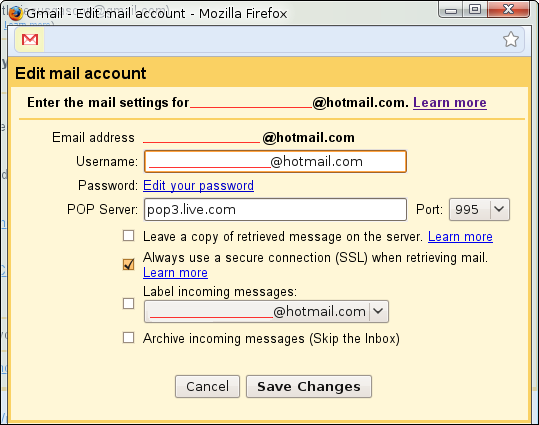
One of the interesting options offered by Gmail is its ability to integrate with other email accounts. To add an account consistent with this possibility, we have to go to Gmail settings (first press on the icon of a nut and then setting). We choose Accounts and Import tab and then "Add a POP3 account you own." In the next step enter the email account you have with Hotmail and then we will get a window where you have to check the options you want set and where to enter the password for that account.

When synchronizing recommend using a different label for Hotmail mails because otherwise all emails from the Hotmail account will go directly to messages received and can be confusing, especially if we use each account for purposes different. Furthermore, the creation of the label is another reason syncing Gmail accounts will download all emails that we have in the Microsoft account and mark them as unread.
http://tuhotmail.com/wp-content/uploads/Hotmail-Gmail.jpg
Select the option "tag incoming messages" and create a new label with the name you want. We also recommend leaving a copy of retrieved message on the server, because otherwise it will delete the messages that Gmail retrieves in your other account. We can add the account.

Gmail also will ask if you want to send messages from the Hotmail account from the Google platform. If so, we are asked to remember the name and data that we have inserted.  We can handle messages with an alias (the identification that appears when we change the account from which you send). We give next step and then choose the easiest option, ie, send messages through Gmail. The account you send us a mail with a check verification code will be inserted into a box.
http://i236.photobucket.com/albums/ff45/knxdt/articulos/gmail-hotmail.png
From now on, we can manage our emails from Hotmail and Gmail account sent from Microsoft. To send messages from the Hotmail account, when composing a message will appear a drop down menu at the top of the message (which brings ...) where we can choose the account from which you send the message.

Hotmail, how to view and send Gmail messages from Hotmail

Hotmail, how to view and send Gmail messages from Hotmail

It is increasingly common for users to have more than one email account on different servers, as a way to use the accounts for different purposes (eg, one more for work and another for personal purposes).

The two free mail servers have been able to reap greater success over the years are Hotmail and Gmail, the stakes of Microsoft and Google respectively.  Sometimes, however, have the post into two separate accounts is somewhat heavy.

We recognize that the configuration process and the subsequent organization in the platform we have been simpler in Hotmail. Microsoft has worked right this synchronization. First, you must access Hotmail settings. To do this, we press on "Options", which is in the top right, then "more options". Under the account management menu choose the option "Send and receive email from other accounts." We click on "Add an email account. "

http://www.vidadigitalradio.com/wp-content/uploads/2010/06/hotmail.png
We introduce data Gmail, Hotmail (address and password). "Advanced" we see that is selected by default the option to leave a copy of messages on the server. Something recommended if you do not want to be deleted to retrieve Gmail messages with Hotmail. R"Next" and a window will appear with the options of using a separate folder when receiving messages or receive in your inbox next to messages from Hotmail (in a rather more clearly than in For Gmail, by the way).

After selecting the desired option, configure Hotmail email account from Google. This may take a while depending on the connection we have and the amount of messages you have stored in your account. The process of loading Gmail mails we felt considerably slower than in the opposite case (when we synchronize Hotmail mails in your Gmail account). In the same configuration process is notified that the process can last a day in the case of many messages that synchronize.
http://tuhotmail.com/wp-content/uploads/Hotmail-Gmail.jpg
Remains to be seen how to send emails from your Gmail account in Hotmail. For this, send us an email account to Gmail with a link to verify that we actually own the account. To do this, when we click to send a message on behalf of the large address on the box to write email. If we have done the steps correctly, you should see the option to choose the email account from Gmail.

Windows Live, how to delete your account and unsubscribe

Windows Live, how to delete your account and unsubscribe

If you're using Hotmail , you know you've also used Windows Live services. We explained. The service, dubbed with this name so obvious, is owned by Microsoft and brings together some tools - not as many as Google - to complete some useful functions for users. 

Currently, Internet users who are registered for Windows Live are offered free Hotmail e-mail, searchable via webmail, up to 25 GB of cloud storage through SkyDrive and access to one of the tools famous, so instant messaging is concerned. We're talking, of course, Windows Live Messenger, one of the first programs to Internet users around the world use to chat with family, friends and coworkers.
windows live 01


Well, all these services are linked. As you know, if you drop an account Google , you lose access to the wide range of functions available to you (most for free, but there are paid services). So, if  you ignore your email, you also need to dispose of blogs, Google Talk, YouTube and iGoogle, and many others. Well, the same will happen with Windows Live. This account is the same as Microsoft brings together all the services offered to its customers (even free), so that once you cancel, you can no longer access them. In fact, you should sign up with a different email address, managed through Hotmail.

windows live 03

In any case, prior to unsubscribe to keep in mind what you have indicated, because you can not recover the email you had stored in the account or the contacts attached to Windows Live Messenger instant messaging service. You can save the information that interests you and then continue the process down. To avoid having to search and dig, we provide the direct link that allows you to streamline the process. Remember that before, you must include username (the email you chose) and password. Follow the steps Microsoft and asks you to click on the unsubscribe button. Your account will have been eliminated.

Hotmail te permite avisarle si han hackeado a tu amigo,enterate como

Hotmail te permite avisarle si han hackeado a tu amigo,enterate como.

Una de las consecuencias más molestas de cuando una cuenta de correo es “hackeada” o “secuestrada” es que es usada para enviar spam o phishing a todos sus contactos. Debido a esto, tiende a ocurrir que cuanto a alguien le secuestran su cuenta sus amigos se suelen dar cuenta antes que el mismo afectado.

Por esto, Microsoft ha implementado en Hotmail una forma sencilla de avisarles si es que creemos que la cuenta de un amigo ha sido secuestrada por spammers. Cuando recibamos algún correo extraño de algún contacto y sospechemos que en realidad no ha sido enviado por él, podemos hacer clic en “Marcar como” y luego seleccionar “Mi amigo ha sido hackeado”, con lo que Microsoft tomará conocimiento del problema y podrá actuar. Además, si marcamos un correo como spam y el remitente está en nuestra lista de contactos, aparecerá automáticamente un cuadro preguntándonos si creemos que se trata de una cuenta secuestrada.


Esta característica de seguridad de Hotmail beneficiará también a los usuarios de Gmail y otros servicios de correo, ya que Microsoft ha anunciado que colaborará con Google y Yahoo, facilitándoles la información que recopilen sobre cuentas posiblemente secuestradas.

De esta forma, si la cuenta de un amigo que usa Gmail o Yahoo Mail ha sido secuestrada, podemos denunciarlo a los de Redmond, y ellos se lo comunicarán a la respectiva empresa para que tome las medidas correspondientes (que normalmente son suspender la cuenta y contactar al usuario para recuperarla y cambiar su contraseña). Como consecuencia, tanto Google como Yahoo podrán responder más rápido frente a estos casos, y así reducir la cantidad de cuentas secuestradas que están siendo usadas para enviar spam a diestra y siniestra.

Además, los de Microsoft han anunciado que prohibirán usar contraseñas demasiado comunes en las cuentas de Windows Live, tales como “password” o “123456”. Esto regirá desde ahora para todos aquellos que se creen una nueva cuenta o que quieran cambiar su contraseña, ellos recibirán un mensaje de error si es que quieren establecer una contraseña mala. Pero además, pronto se les pedirá que mejoren su contraseña a aquellas personas que estén usando una clave poco segura desde antes.

Related Posts Plugin for WordPress, Blogger...

Special Offer for Readers